


Nov 12, 2010
How Internet Browsers Work
Ever find yourself asking how our favorite browser works? How it can display to you the website you wanted? Here's an interesting comic showing the simplest explanation :)

Oct 10, 2010
Networking with Windows 7's XP Mode

Oct 7, 2010
What is a Hard Disk Drive Crash?

Oct 4, 2010
Ditch Internet Explorer 6 (IE6)

Indeed, there's only one legitimate reason for sticking with it: work. If you're using, say, a company laptop, you may have no choice but to use the IT department-approved browser, which in many cases is still IE6.
Otherwise, it's time to make a change. I highly recommend upgrading to Internet Explorer 8, which will very likely solve your problem and open the door to all kinds of worthwhile features: tabs, Accelerators, Web Slices, and a wealth of malware and phishing protections.
Oct 1, 2010
Why Computers Become Slooooow

1) Scan for malware. A program that means you no good just might be the culprit. If your PC is mass-mailing spam or taking part in some other evil activity without your knowledge, that could slow it down. I assume you already have a good anti-virus program, but just to be safe, install, update, and scan your PC with either SUPERAntiSpyware or Malwarebytes' Anti-Malware.
Sep 28, 2010
How To Restore Outlook Express Backup Folder

What appears as a folder in Outlook Express isn't really a folder. As far as Windows is concerned, it's a single file with a .dbx extension. The email program has to know it's there to look for it and open it.
Sep 25, 2010
Keep Your Keyboard Clean

Over time, all keyboards accumulate dust, crumbs, and other everyday dirt. And all it takes for, say, your 'S' key to stop working is for something to get lodged under it.
Sep 22, 2010
Blue Screen of Death During Startup

Sep 19, 2010
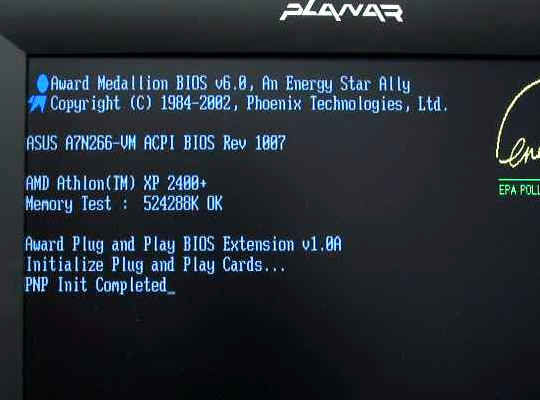
Troubleshoot POST Problems
Sep 16, 2010
Troubleshooting Your PC

State the problem clearly, even if it's only to yourself. If you need to, write it down. "The system won't boot" isn't good enough. Instead: "The system won't boot; when it tries to boot, it generates an error saying that no operating system is installed. When I try to reboot, I can see that my hard drive isn't visible to the BIOS."
Sep 13, 2010
How to Backup Firefox Preferences

Firefox saves your preferences and settings in a single place. Some of those settings you can alter in the Options dialog box, but not all of them. The others require going into an obtuse, difficult-to-understand work environment called about:config.
And if you play around in about:config, changing settings that you think you understand, you can really mess things up. That's why, when you enter this environment--which you do by clicking the address bar (pressing CTRL-L will not work in this situation), typing about:config, and pressing ENTER--you have to click a button that reads "I'll be careful, I promise!"
Sep 10, 2010
Use Hibernate for Laptops

Want to know why? The default lid-closing action for most laptops is to put the system in Sleep mode, and Windows is notoriously bad at waking up properly. I advise most laptop users to use Hibernate mode instead, as it's much more reliable when it comes to waking up.
Sep 7, 2010
Re-Use Your Old Laptop's Hard Drive

An enclosure is essentially an external case for that internal drive, one that lends it a USB interface. When all is said and done, you'll have a compact USB hard drive you can use for backups, extra storage, transporting files, and so on.
More immediately, an enclosure lets you easily restore your data onto the new drive--a simple drag-and-drop operation. With that done, you'll have to decide if you want to wipe the drive or keep it intact.
Sep 4, 2010
Upgrade Your Laptop's Memory

Then I remembered that the machine is about three years old and wasn't a powerhouse to begin with. So I checked the RAM. Bingo: it has only 1GB. Windows Vista needs at least 2GB to run smoothly.
Upgrading a laptop's RAM may sound like a big deal, but it's actually the single easiest upgrade there is. The only challenge lies in determining how many RAM modules your system currently has and what kind they are.
Sep 2, 2010
How to Fix a Rogue Process

A process is a program or an independent piece of a program. As I write this, I have six applications, but 57 processes, running on my computer.
And if the problem keeps occurring, it's best to find out what that process is about and stop it from loading altogether.
Aug 31, 2010
Fix Internet Explorer 8's Crashes

The smart short-term workaround for any browser problem: try another browser.
Anyway, you've got two likely culprits here: a corrupted add-on or a bad Flash plug-in. I suspect the latter, so let's start with that.
Aug 28, 2010
Never Open Your Power Supply

Power supply units (PSUs) aren't really meant to be opened and messed with on the inside. Most likely you accidentally broke something or put it together wrong.
Since you've already done the deed, you might as well try it again to make sure nothing is broken or out-of-place. Pay particular attention to dull-colored, cold solder connections, to see if they're damaged.
Aug 25, 2010
How To Save Your MP3s

If you really don't want to rip all of your CDs again (or re-download them from the digital store), I'm going to recommend a multi-prong approach:
1) Keep them on your internal hard drive. Not only will they be convenient for listening, but they'll move to your next computer along with the rest of your data.
Aug 21, 2010
Fill Out Forms Faster with Tab Key

As I mentioned a couple years back when I first mentioned this tip, I continue to be amazed by how many people don't know the faster, easier way to navigate Web forms: with the Tab key.
Aug 18, 2010
Is It Okay To Work During a Windows Update?

Which isn't to say that there aren't some jobs you should probably avoid at that time. Defragging isn't a good idea while an update is going on. I'd also avoid installing or uninstalling an application.
The worst part of the update experience (assuming the update itself doesn't do more harm than good), is the message popping up asking for a reboot. Luckily, you can put off the actual reboot until it's convenient for you.


